Additional information
This appendix collects supporting reference material referred to elsewhere in the manual - the feedback agent that allows a Real Server’s reported load to influence how traffic is distributed to it, and the CIDR notation the appliance uses to express subnet masks.
Server Feedback Agent
The load balancer can dynamically modify the weight of each Real Server by gathering data from either a custom feedback agent or a HTTP server. Reducing the weight of a server compared to others in the pool will reduce the amount of traffic it receives.
For layer 4 VIPs, both the agent and HTTP Server methods can be used, for Layer 7 VIPs, only the agent method is supported.
By default, the agent listens on TCP port 3333, although this can be changed if required.
A telnet to port 3333 on a Real Server with the agent installed returns the current idle value as an integer value between 0 and 100. By default, the idle value is based on current CPU utilization. This can also be based on RAM utilization and the number of current connections or a combination of all three.
This can be configured by modifying the XML configuration file located in the agent’s installation folder - by default C:\ProgramData\LoadBalancer.org\LoadBalancer. The file can be edited directly or by clicking the Configuration button in the agent monitor program - see "Controlling the Agent" below.
The load balancer uses the formula (idle value/100) * initial weight to find the new dynamic weight.
|
The "initial weight" is the weight set in the WebUI for each Real Server. For more information about the feedback agent, please refer to this blog. |
Windows Agent
The latest Windows feedback agent (v4.6.0) can be downloaded here.
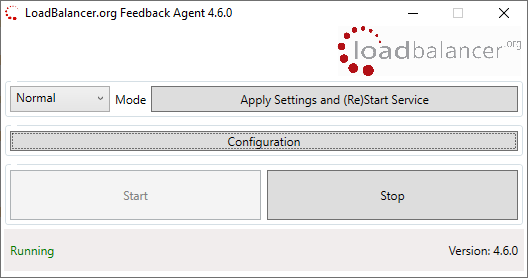
Linux/Unix Agent
The Linux feedback agent files can be downloaded using the following links:
readme file: https://downloads.loadbalancer.org/agent/linux/v4.1/readme.txt
xinetd file: https://downloads.loadbalancer.org/agent/linux/v4.1/lb-feedback
feedback script: https://downloads.loadbalancer.org/agent/linux/v4.1/lb-feedback.sh
Installation & Testing
Install xinetd - if not already installed:
apt-get install xinetd
Insert the following line into /etc/services:
lb-feedback 3333/tcp # Loadbalancer.org feedback daemon
Then run the following commands:
cp lb-feedback.sh /usr/bin/lb-feedback.sh
chmod +x /usr/bin/lb-feedback.sh
cp lb-feedback /etc/xinetd.d/lb-feedback
chmod 644 /etc/xinetd.d/lb-feedback
/etc/init.d/xinetd restart
To test the agent:
telnet 127.0.0.1 3333
Trying 127.0.0.1...
Connected to 127.0.0.1.
Escape character is '^]'.
95%
Connection closed by foreign host.
| The agent files must be installed on each Real Server. |
HTTP Server
You can use any HTTP server responding on port 3333 to give feedback information to the load balancer. The format of this information must be an integer number of 0-100 without any header information. Using this method, you can generate a custom response based on your application’s requirements.
Appliance IPv4 Address Format (CIDR notation)
When specifying IP addresses on the appliance, CIDR format is used. The following table shows the various masks and the corresponding IPv4 IP/CIDR equivalents:
| Subnet Mask | IP/CIDR Suffix |
|---|---|
255.255.255.255 |
a.b.c.d/32 |
255.255.255.254 |
a.b.c.d/31 |
255.255.255.252 |
a.b.c.d/30 |
255.255.255.248 |
a.b.c.d/29 |
255.255.255.240 |
a.b.c.d/28 |
255.255.255.224 |
a.b.c.d/27 |
255.255.255.192 |
a.b.c.d/26 |
255.255.255.128 |
a.b.c.d/25 |
255.255.255.000 |
a.b.c.d/24 |
255.255.254.000 |
a.b.c.d/23 |
255.255.252.000 |
a.b.c.d/22 |
255.255.248.000 |
a.b.c.d/21 |
255.255.240.000 |
a.b.c.d/20 |
255.255.224.000 |
a.b.c.d/19 |
255.255.192.000 |
a.b.c.d/18 |
255.255.128.000 |
a.b.c.d/17 |
255.255.000.000 |
a.b.c.d/16 |
255.254.000.000 |
a.b.c.d/15 |
255.252.000.000 |
a.b.c.d/14 |
255.248.000.000 |
a.b.c.d/13 |
255.240.000.000 |
a.b.c.d/12 |
255.224.000.000 |
a.b.c.d/11 |
255.192.000.000 |
a.b.c.d/10 |
255.128.000.000 |
a.b.c.d/9 |
255.000.000.000 |
a.b.c.d/8 |
254.000.000.000 |
a.b.c.d/7 |
252.000.000.000 |
a.b.c.d/6 |
248.000.000.000 |
a.b.c.d/5 |
240.000.000.000 |
a.b.c.d/4 |
224.000.000.000 |
a.b.c.d/3 |
192.000.000.000 |
a.b.c.d/2 |
128.000.000.000 |
a.b.c.d/1 |