Transparency at layer 7
HAProxy is a reverse proxy which means that a new connection is established from the proxy out to the backend server in response to an inbound client connection to the proxy. This means that the source IP address of the packet reaching the Real Servers will not be the client’s IP address, but an IP address owned by the load balancer. The source IP address applied depends on the configuration. By default, the IP address of the network interface is used, but this can also be configured to be any IP address that the load balancer owns using the Backend source address field on the backend’s Connection options step (Advanced Mode only).
The load balancer can provide the actual client IP address to the Real Servers in two ways:
-
By inserting a header that contains the client IP source address. For HTTP traffic the X-Forwarded-For (XFF) header is used, for TCP traffic the Proxy Protocol Header is used.
For more information on XFF headers, please refer to Mozilla - X-Forwarded-For Header, for more information on Proxy Protocol headers, please refer to HAProxy Technologies - The PROXY Protocol. -
By modifying the Source Address field of the IP packets and replacing the IP address of the load balancer with the IP address of the client. The load balancer uses TProxy for this purpose.
In many cases, option 1 (using headers) can be used to achieve your objectives. Option 1 is easier to implement because there are no network topology requirements.
Inserting Headers
X-Forwarded-For (XFF) Headers
X-Forward-For headers are inserted by HAProxy when the Layer 7 Service frontend option Enable X-forwarded-for header is enabled. A new X-Forwarded-For header is appended by the load balancer containing the client’s IP address. This information can then be extracted by the Real Servers for use in web applications or logging.
Proxy Protocol Headers
To configure HAProxy to send Proxy Protocol Headers, the Layer 7 Service backend dropdown Send proxy protocol must be set to the required header version/type.
To configure HAProxy to receive Proxy Protocol Headers, the Layer 7 Service frontend option Proxy protocol must be enabled. This will configure the Layer 7 Service to expect Proxy Protocol Headers for all connections. With this method, the Layer 7 Service will only accept connections from sources that present Proxy Protocol Headers.
Using TProxy to Modify the Source IP Address
Loadbalancer.org appliances utilize TProxy to modify the source IP address of each packet. TProxy is enabled per service using the Enable TProxy option on the Layer 7 service backend - edit the backend in Advanced Mode and enable Enable TProxy on the Backend Configuration - Layer 7 advanced step (for more information, see Backend Configuration - Layer 7 advanced). When TProxy is enabled, it’s important to be aware of the topology requirements for TProxy to operate correctly. Both one-arm and two-arm topologies are supported:
One-arm Deployments
-
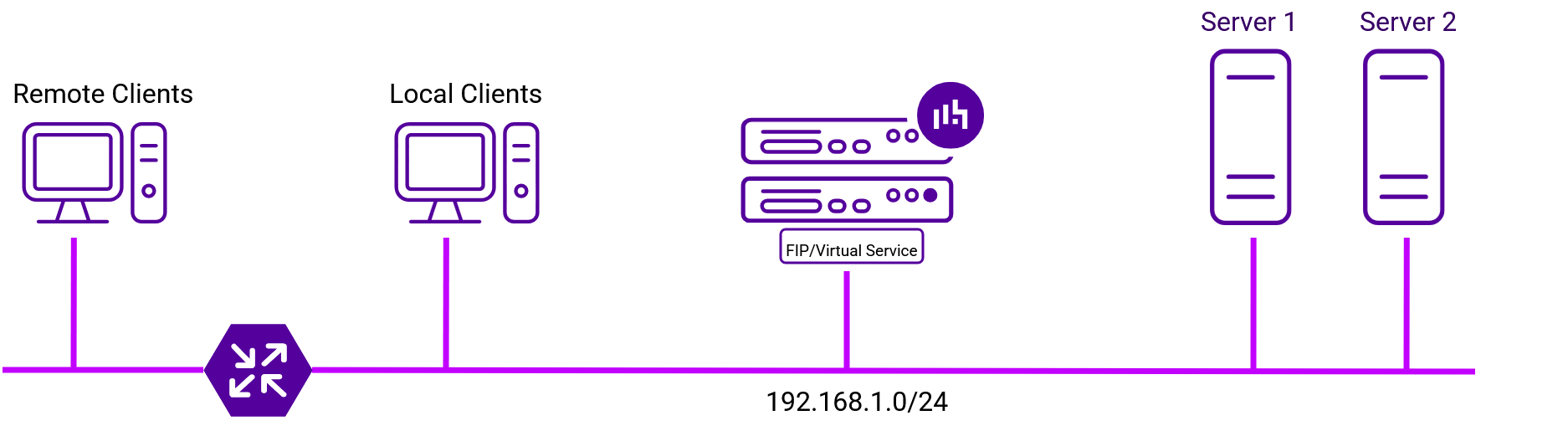
Here, the VIP is brought up in the same subnet as the Real Servers.
-
To support remote clients, the default gateway on the Real Servers must be an IP address on the load balancer and routing on the load balancer must be configured so that return traffic is routed back via the router.
| For a multi-node cluster, a floating IP should be added to the appliance and used as the Real Server’s default gateway. This ensures that the IP address can "float" (move) between nodes. |
-
To support local clients, return traffic would normally be sent directly to the client bypassing the load balancer which would break TProxy. To address this, the routing table on the Real Servers must be modified to force return traffic to go via the load balancer.
Two-arm Deployments
-
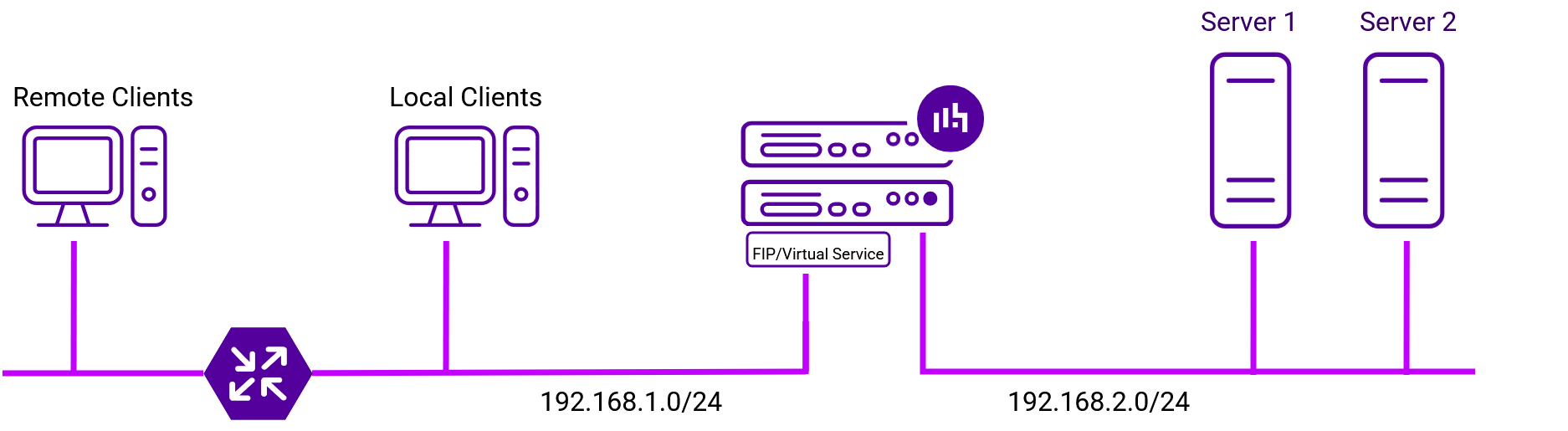
Here, two subnets are used. The VIP is located in one subnet and the load balanced Real Servers are located in the other. The load balancer requires two interfaces, one in each subnet.
| This can be achieved by using two network adapters, or by creating VLANs on a single adapter. |
-
The default gateway on the Real Servers must be an IP address on the load balancer.
| For a multi-node cluster, a floating IP should be added to the appliance and used as the Real Server’s default gateway. This ensures that the IP address can "float" (move) between nodes. |
-
Clients can be located in the same subnet as the VIP or any remote subnet provided they can route to the VIP.